Navigation Coordination
We have gone through how the global planner works, and how the global plan informs the local planner. The last major step of this navigation exploration is to show how these pieces interact through time.
Base Case
In the ideal world, we can compute the global plan once right after we receive the goal pose, and then use the local planner to produce command velocities to get to the goal.
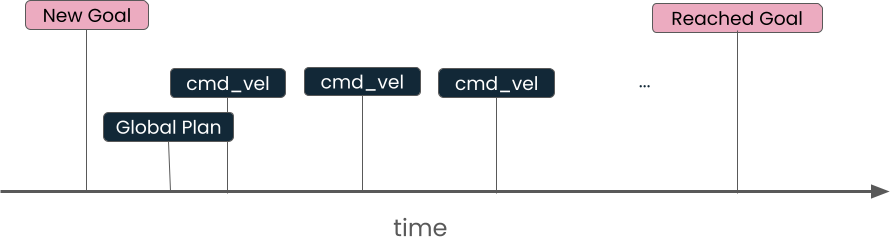
You could coordinate this by writing a node that first calls the ComputePathToPose action (getting you the global plan), and then passing this to the FollowPath action.
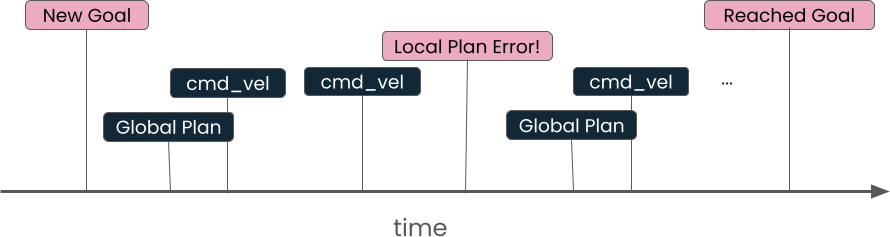
However, when navigating the real world, the environment can change and the planners can fail. In the case, you will need a more complex control flow.
Repeated Global Planning
One approach to dealing with local planning failures is to trigger global planning. If there is an obstacle in the robot's path blocking the local planner, create a new global plan that goes around it.

This is a more robust control flow than just giving up when a failure is detected, but still could handle more cases. For the more complex examples, we’ll need a more sophisticated data structure.
Behavior Trees
Behavior trees are a way of describing a control flow for any type of process, and are used extensively in ROS and Nav2. We’re using XML-based BehaviorTree.CPP and you should look at their site to learn the details of the system.
Let’s explore an example similar to the Nav-specific example given in the core Nav2 behavior tree documentation.
For the moment, we can ignore the root element. In English, we would say that this behavior tree is a sequence containing two "branches". The first branch is the ComputePathToPose action, which we know takes in a goal and produces a path. The second branch is the FollowPath action, which uses that path. The two branches being part of a sequence means that each action is done sequentially, i.e. one after the other.
This example is equivalent to the Base Case approach we discussed earlier, which we know has shortcomings.
Replanning and Recovery Behavior Tree
By default, our navigation configuration for Stretch 4 uses the NavigateToPose with Replanning and Recovery behavior tree.
Let’s start with a small snippet of that tree:
A recovery node has exactly two branches: If the first one fails, it will attempt to do the second. So if ComputePathToPose fails, it will attempt the recovery sequence listed, including clearing the global costmap.
The snippet above is surrounded by <RateController hz="1.0">, which means that ComputePathToPose is computed once every second.
The FollowPath action is similarly surrounded by a recovery node with its own costmap clearing recovery.
The combined ComputePathToPose/FollowPath sequence is itself surrounded by a recovery node, with a RoundRobin selection of different recoveries for it to try in sequence.
Last updated
Was this helpful?
