> For the complete documentation index, see [llms.txt](https://docs.hello-robot.com/llms.txt). Markdown versions of documentation pages are available by appending `.md` to page URLs; this page is available as [Markdown](https://docs.hello-robot.com/stretch4_docs/working-with-stretch/nav_u/moving-the-robot.md).
# Moving the Robot
The goal of this tutorial is to learn how to move the Stretch 4 using [ROS interfaces](https://docs.ros.org/en/jazzy/Concepts/Basic/About-Interfaces.html). We will be doing this by writing new code to teleoperate the robot with a joystick. This can be performed with either a real robot or the simulated robot.
This will also cover the basics of publishing and subscribing to topics in ROS 2.
## The Joy of Publishing
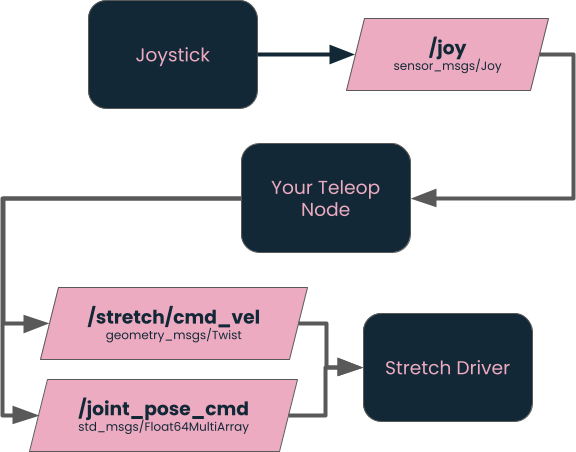
At its core, ROS is all about multiple different programs running simultaneously, sharing information with each other through different ROS Interfaces. The most common method is *publishing* and *subscribing* messages.
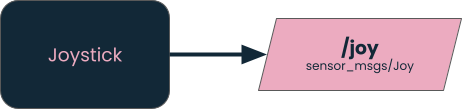
For example, for this tutorial, we want a node (a.k.a. program) that publishes (a.k.a. creates and sends) messages about the state of the joystick.
Each stream of messages has a *type*, which in this case is `sensor_msgs/Joy`, and a *topic*, which in this case is `/joy`.
### Joystick Nodes
For this tutorial, we will **not** be using the joystick included with the Stretch 4, but will instead be recreating that functionality with a different joystick. We’ll cover two options, but one of the strengths of ROS is that you can swap out the source of the Joy messages without it affecting the rest of your system.
#### Actual Joysticks
To use an actual hardware joystick, first install the [joystick driver node](https://github.com/ros-drivers/joystick_drivers/blob/ros2/joy/README.md):
```bash
sudo apt-get install ros-jazzy-joy
```
Then, with the hardware joystick plugged in or connected to your computer, run:
```bash
ros2 run joy joy_node
```
If connected properly, it should print out a message with the name of the joystick.
#### RViz Joystick
Alternatively, you can use a simulated joystick within RViz.
> **Warning**
>
> TODO: Change this to apt-get when RViz Joy Panel is available on the buildfarm.
>
> For now, clone `git@github.com:hello-robot/hello_ros_utils.git` into your workspace with the `joy_panel` branch and compile.
To launch RViz with the panel that publishes joystick messages, run:
```bash
ros2 launch joy_rviz_panel joy_rviz.launch.py
```
### Joystick Messages
The structure of the messages published by the joystick nodes is [defined here](https://github.com/ros2/common_interfaces/blob/rolling/sensor_msgs/msg/Joy.msg). It primarily contains:
* An array of floating-point numbers from `-1.0` to `+1.0` representing the state of each joystick axis.
* An array of integers representing the state of each joystick button (typically either `0` or `1` for unpressed and pressed respectively).
It takes a little investigation to figure out the order of the axes and buttons. To do that, run your chosen joystick node, and then echo the values on the console by running:
```bash
ros2 topic echo /joy
```
As you control the joystick, make note of the order of buttons and the order and direction of the axes. For example, when you push left on the joystick, what axis value changes, and does it move toward `-1.0` or `+1.0`.
## The Delight of Subscribing
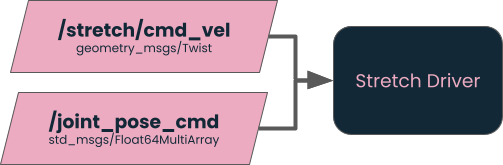
The robot (real or simulated) also subscribes to (a.k.a. recieves) messages to tell it how to move.
### Twist Messages
To make Stretch drive around, you need to publish [Twist messages](https://github.com/ros2/common_interfaces/blob/rolling/geometry_msgs/msg/Twist.msg) on the `/stretch/cmd_vel` topic.
Each Twist message has:
* A **linear** component (meters per second) describing translation.
* An **angular** component (radians per second) describing rotation.
Stretch 4 can move:
* Forward and backward
* Sideways
* Rotationally
You can explore this by publishing messages directly from the command line:
```bash
ros2 topic pub /stretch/cmd_vel geometry_msgs/msg/Twist "{linear: {x: 0.0, y: 0.0}, angular: {z: 0.2}}"
```
### Joint Pose Commands
One way to move the Stretch arm is by publishing [Float64MultiArray](https://github.com/ros2/common_interfaces/blob/rolling/std_msgs/msg/Float64MultiArray.msg) messages on the `/joint_pose_cmd` topic.
The `joint_pose_cmd` topic expects an array of eight floating-point values representing:
1. Arm extension
2. Lift height
3. Wrist yaw
4. Wrist pitch
5. Wrist roll
6. Base translation (sometimes)
7. Base rotation (sometimes)
8. Gripper state
We will ignore Base movement for now, since it is handled by Twist messages.
To move the arm, first we must enable streaming to the pose topic:
```bash
ros2 service call /activate_streaming_position std_srvs/srv/Trigger '{}'
```
Then we can manually publish messages from the command line. To move the arm all the way in and down:
```bash
ros2 topic pub /joint_pose_cmd std_msgs/msg/Float64MultiArray "{data: [0.0, 0.0, 0.0, 0.0, 0.0, 0.0, 0.0, 0.0]}"
```
Move the arm up and out:
```bash
ros2 topic pub /joint_pose_cmd std_msgs/msg/Float64MultiArray "{data: [0.3, 1.0, 0.0, 0.0, 0.0, 0.0, 0.0, 0.0]}"
```
## Publishing and Subscribing via Python
Now, in order to control the robot with the joystick, we are going to write a Python program that translates `Joy` messages into robot commands.
### Python Template
```python
# Import the Robot Client Library (RCL) for Python
import rclpy
from rclpy.node import Node
# Import the different ROS interface types that we will need
from sensor_msgs.msg import Joy
from geometry_msgs.msg import Twist
from std_msgs.msg import Float64MultiArray
from std_srvs.srv import Trigger
# We are implementing a Node, which you can generally think of as a ROS program.
class Stretch4Teleop(Node):
def __init__(self):
super().__init__('stretch4_teleop')
# Create the two publishers with their message type and topic name
# (ignore the 10 for now)
self.twist_publisher = self.create_publisher(Twist, '/stretch/cmd_vel', 10)
self.joint_publisher = self.create_publisher(Float64MultiArray, '/joint_pose_cmd', 10)
# Create the subscription using the message type, topic name,
# and the function to call when there's a new message.
self.subscription = self.create_subscription(Joy, '/joy', self.joy_callback, 10)
# Code to automatically call the service which activates streaming
self.active_srv = self.create_client(Trigger, '/activate_streaming_position')
while not self.active_srv.wait_for_service(timeout_sec=1.0):
self.get_logger().warn('service not available, waiting again...')
self.active_srv.call_async(Trigger.Request())
self.get_logger().info('Ready')
def joy_callback(self, msg):
# This is the code that is called each time there is a new Joy message
# Logging the key message components to the terminal. Feel free to remove.
self.get_logger().info(f'Axes: {list(msg.axes)}')
self.get_logger().info(f'Buttons: {list(msg.buttons)}')
# Create a new message of type Twist
cmd = Twist()
# TODO: Fill in logic for next three lines
cmd.linear.x = 0.0
cmd.linear.y = 0.0
cmd.angular.z = 0.0
# Send the message
self.twist_publisher.publish(cmd)
# Create a new message of type Float64MultiArray
joints = Float64MultiArray()
joints.data = [0.0] * 8
# TODO: Add logic to publish to joint pose cmd when buttons are pushed.
# Below this point is basically boilerplate to say
# keep processing messages until the program quits
def main(args=None):
rclpy.init(args=args)
node = Stretch4Teleop()
rclpy.spin(node)
if __name__ == '__main__':
main()
```
Assuming the code is saved as `stretch4_teleop.py`, run it with:
```bash
python3 stretch4_teleop.py
```
## Exercise
* **Task 1:** Fix the first `TODO` by sending non-zero commands based on the joystick. Note that the maximum speeds you should send are `0.12 m/s` in X and Y and `0.5 rad/s`.
* **Task 2:** Fix the second `TODO` by sending joint pose commands when certain buttons are pushed. Note that you shouldn’t publish any message when no button is pressed.
---
# Agent Instructions
This documentation is published with GitBook. GitBook is the documentation platform designed so that both humans and AI agents can read, navigate, and reason over technical content effectively. Learn more at gitbook.com.
## Querying This Documentation
If you need additional information that is not directly available in this page, you can query the documentation by asking a question.
Perform an HTTP GET request on the following URL with the `ask` and `goal` query parameters:
```
GET https://docs.hello-robot.com/stretch4_docs/working-with-stretch/nav_u/moving-the-robot.md?ask=&goal=
```
`ask` is the immediate question: it should be specific, self-contained, and written in natural language.
`goal` is what the user is ultimately trying to achieve, the reason they need the answer. Sharing it helps GitBook give you a better, more relevant answer. A goal is most helpful when it describes the outcome the user wants rather than restating the question. For example, with `ask=how do I create an API token`, a goal like `automate deployments from our CI pipeline` lets GitBook tailor the answer to that use case.
The response will contain a direct answer to the question and relevant excerpts and sources from the documentation.
Use this mechanism when the answer is not explicitly present in the current page, you need clarification or additional context, or you want to retrieve related documentation sections.